
Motivation
Amazon bietet auf seinem Store DRM-freie MP3 Dateien an, die man mit dem Amazon MP3-Downloader herunterladen kann. Ich habe probiert die Anwendung auf 64Bit Lubuntu zu installieren und, da ich nach ca. 1/2 Stunde Arbeit, keinen Erfolg hatte, habe ich mich für clamz entschieden. Clamz ist ein Kommandozeilen-Tool, das in der Lage ist, die beim Download üblichen amz Dateien, in mp3 Dateien zu entpacken – quasi eine Alternative zum offiziellen MP3-Downloader. Das Tool ist wirklich einfach zu bedienen, im Grunde genügt ein Befehl, um die amz-Datei in eine, oder mehrere mp3-Dateien zu konvertieren.
Quicky
Vorgehensweise:
- clamz auf Lubuntu installieren
- Aktivieren des MP3-Download Modus hier
- Kaufen, Kaufen, Kaufen 😉
- amz-Datei-Download Tipp: Ich habe mir angewöhnt alle meine Download in ~/Downloads zu speichern
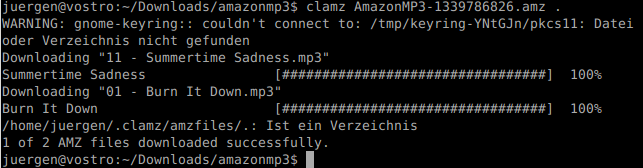
- Konsole öffnen und mit clamz die amz-Datei(en) in mp3 konvertieren
clamz amazonmp3.amz -d ~/amazon

- In das Unterverzeichnis „amazon“ wechseln
- Musik hören und genießen 🙂
Konfiguration
Fazit
motivation
Amazon offers in its web store DRM-free MP3 downloads. On Windows you can use the Amazon MP3-Downloader. This tool was also available on Ubuntu based operating systems, but currently not for Lubuntu 12.04. I’ve tried to install it for half an hour – no success. To save time I’ve decided to look for an alternative and found a tool called clamz. Clamz is a command line tool and is able to convert amz files in mp3 files.
quick guide
- install clamz on Lubuntu
- activate mp3 download mode on Amazon here (german site)
- buy, buy, buy 😉
- open a terminal and convert amz to mp3:
clamz amazonmp3.amz -d ~/amazon
- go to subfolder ‚amazon‘
- listen and enjoy 🙂
 RedEyeWatching